O Cabal Bot é um sistema de automatização do jogo Cabal Online.
O sistema foi criado em 2017 e funciona desde então facilitando a vida das pessoas que não podem ficar o dia inteiro na frente do computador para jogar.
O Bot funciona com um sistema humanizado, reproduzindo de forma natural o comportamendo do jogador dentro das dungeons o que o torna uma ferramenta extremamente segura e confiavel.
------------------------------------------------------------------------------------------------------------ Sobre os sistemas:
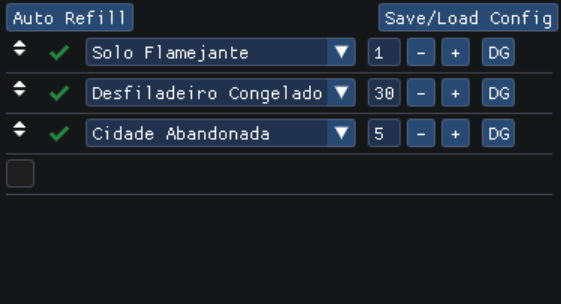
Dungeon Connect - Este sistema conecta diferentes tipos de dungeons em uma lista a ser cumprida em ordem, garantindo 24/7 de farm sem interrupções.
Auto Refill - le o inventario do jogador conectado buscando entradas de dungeons e preenche automaticamente na lista do Dungeon Connect.
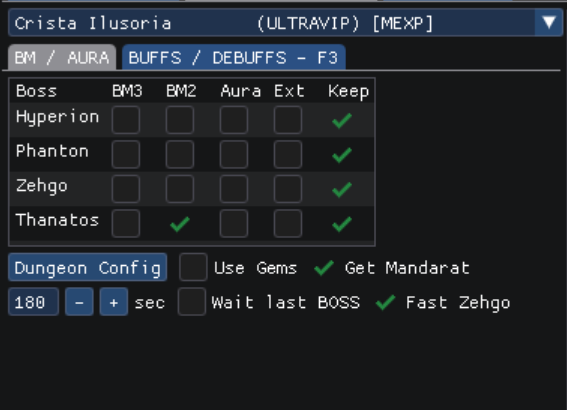
BM/AURA, Buffs/DEBUFFs e sistemas comuns - estas abas são comuns a todas as dungeons e cada uma possui uma, garantindo uma configuração especifica para cada dungeon, com suporte para bm, aura, extender aura, dual bm+aura, manter ou cancelar o bm quando terminar de matar o boss, os buffs funcionam da mesma forma garantindo debuffs e buffs no momento de encontro com os bosses de cada dungeon.
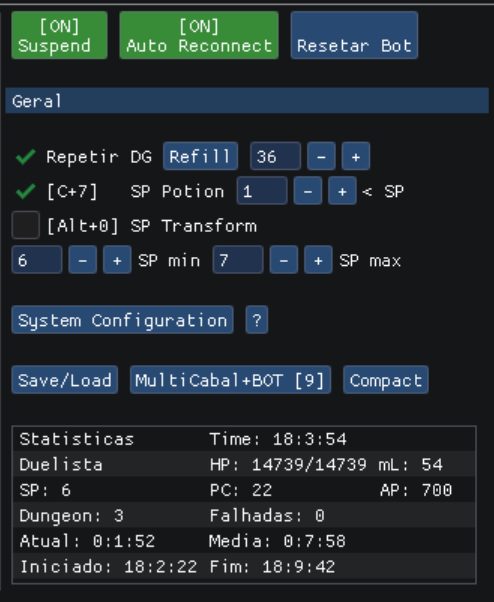
Painel de gerenciamento - Esta parte do bot é onde se gerencia o funcionamento geral do bot, podendo iniciar, pausar ou cancelar o funcionamento do bot.
Auto Reconexão - se o personagem for desconectado o bot reconectará o jogador dentro da dungeon novamente evitando perda da entrada.
Controles Gerais - aqui ficam opções como repetir dgs, quantidade de repetições, uso de poção SP, transformação(em criatura) para encher SP entre dungeons, botão para sistema de configuração, botão para salvar e carregar pre configurações e modo compacto que faz o bot ficar pequeno.
Auto Refill - obtém a quantidade total de entradas da dungeon selecionada direto do inventario do jogador e preenche com o valor correto.
MultiCabal + BOT - esta função garante a abertura de mais janelas do cabal com bot para farmar com mais personagens em um mesmo computador.
Stats - janela de de estatisticas gerais do que esta acontecendo atualmente no bot.
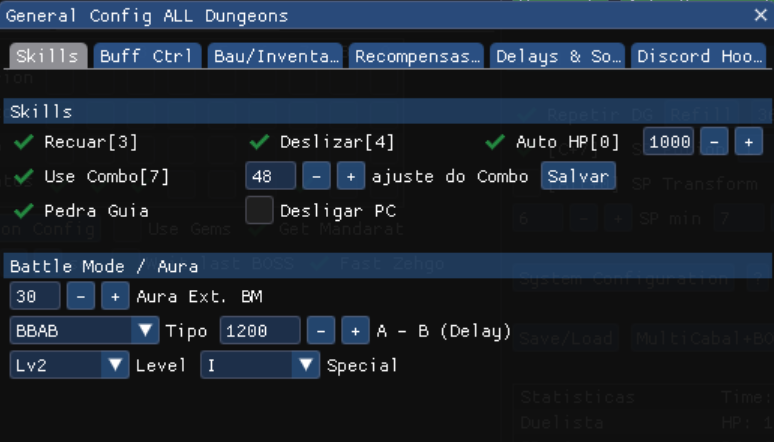
Skills - Configuração para uso de skills deslizar e recuar, usar poção pela quantidade de hp perdido, uso do combo e ajuste do tamanho da barra, pedra guia para retornar a base quando terminar de farmar e desligar o computador depois que o farm terminou evitando deixar ligado atoa.
Battle Mode /Aura - determinar o valor do bm para extender aura, tempo de delay de skills A e B do BM3, sequencias de combo, sinergias e nivel do especial.
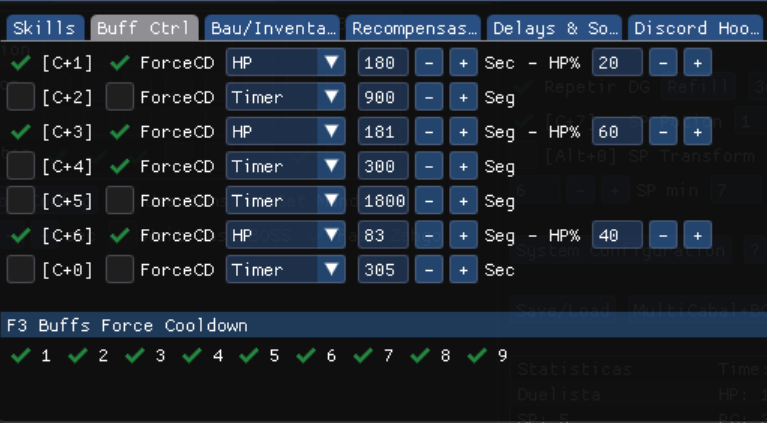
CtrlBuff - sistema de gerenciamento dos buffs da barra superior Ctrl, este sistema serve para uso de poções e buffs de proteções baseados na porcentagem de HP perdido do personagem e/ou tempo de resfriamento da poção ou buff para recast, opção de ForceCD serve para o bot verificar se a skill pressionada entrou em resfriamento.
F3 Buffs ForceCD - Esta opção aplica verificação de resfriamento no uso de skills da barra do F3 que é relacionada ao debuff dos boss em cada dungeon.
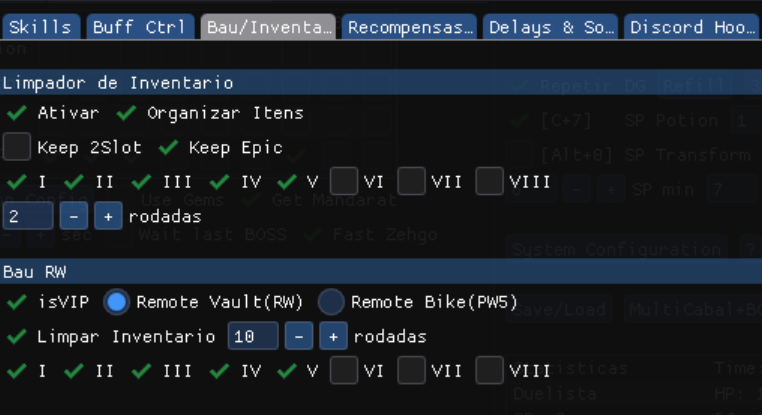
Bau /Inventario - Esta sessão cuida da limpeza do inventario a parte superior determina a quebra de items, podendo decidir se quer manter items 2 slots e com opções epicas(amp,dc,etc...).
A parte inferior é para guardar apps e materiais no bau, marcando a opção de RW ou PW ele abre os diferentes tipos de baus disponiveis, marcando a opção isvip ele abre o bau pelo botão do inventario em vez de clicando na moto.
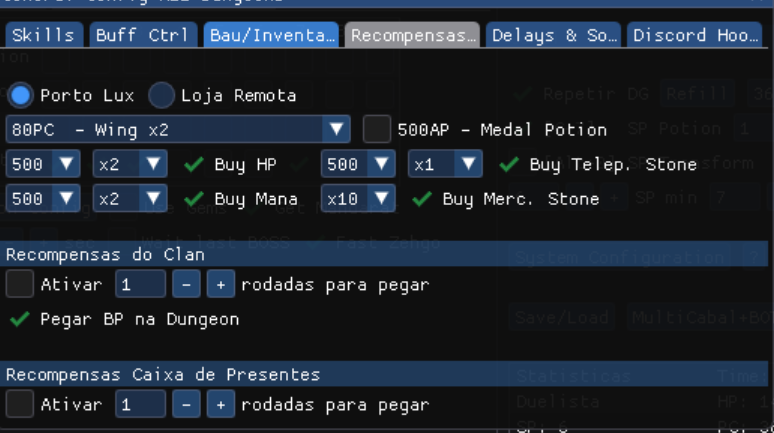
Recompensas & Compra - habilita o bot a ir a Porto Lux (premium no jogo necessário) para pegar recompensas de cubo e comprar hp, mana, pedras de mercenario e de teleporte.
Abaixo recompensas de clan e caixa de presente a serem configuradas baseado no numero de dungeons rodadas para o intervalo de coleta.
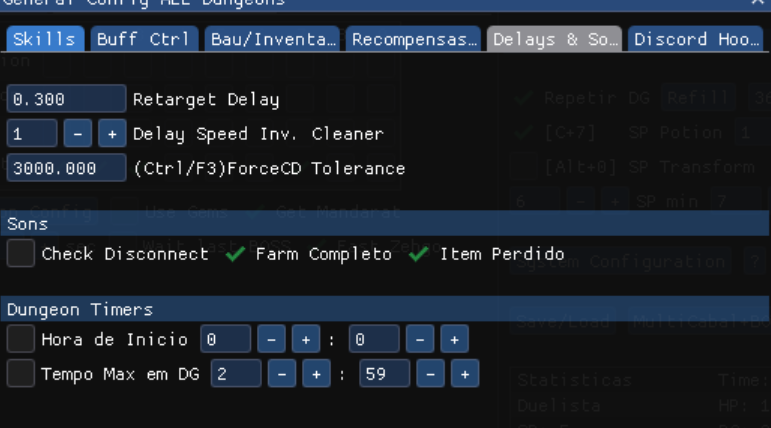
Delays & Sound - demora configuravel entre troca de alvos, demora na quebra de items e tolerancia maxima do uso do ForceCD nas skills, Sons emitidos pelo bot como aviso para algumas situações.
Dungeon Timers - Configure hora de inicio das dungeons, serve para quando a quantidade e tempo reseta depois da meia noite e quer deixar pre configurado.
Tempo Max em DG funciona para dizer ao bot com quanto tempo de dungeon ele deveria sair, usado quando por algum motivo o bot buga dentro da dungeon e faz com que ele permaneça mais tempo do que o normal, com essa opção ativada evita o bot ficar na DG até acabar o tempo dela.
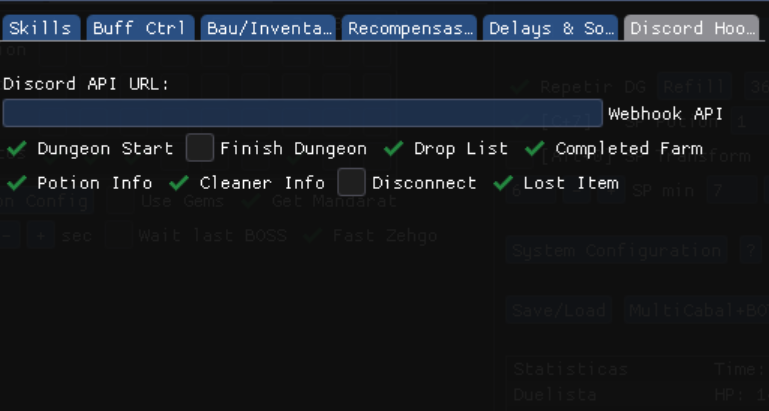
Discord hook - usa o discord para notificar sobre os status do bot, anunciando drops, hora de inicio, quantidade de poções entre outras opções muito uteis quando não se pode estar perto do computador para acompanhar o funcionamento do bot
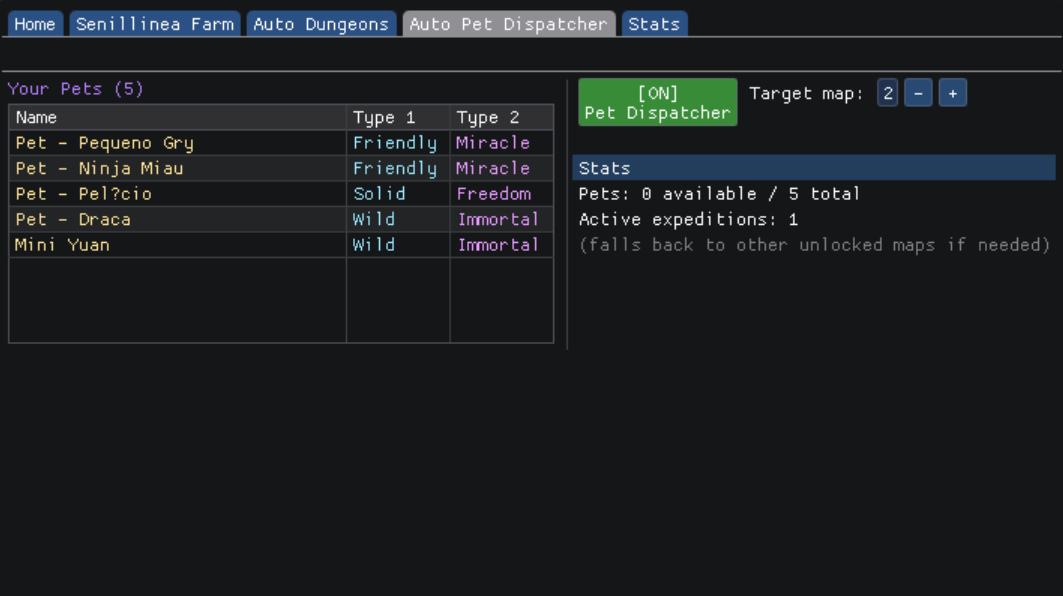
Bot de despacho de pets - Este bot despacha pets automaticamente entre dungeons, recebe recompensas e aguarda o tempo de resfriamento, possui suporte para multiplos despachos, seleção de mapa primario para despacho mas se não for possivel despachar naquele mapa tentará todos os outros mapas
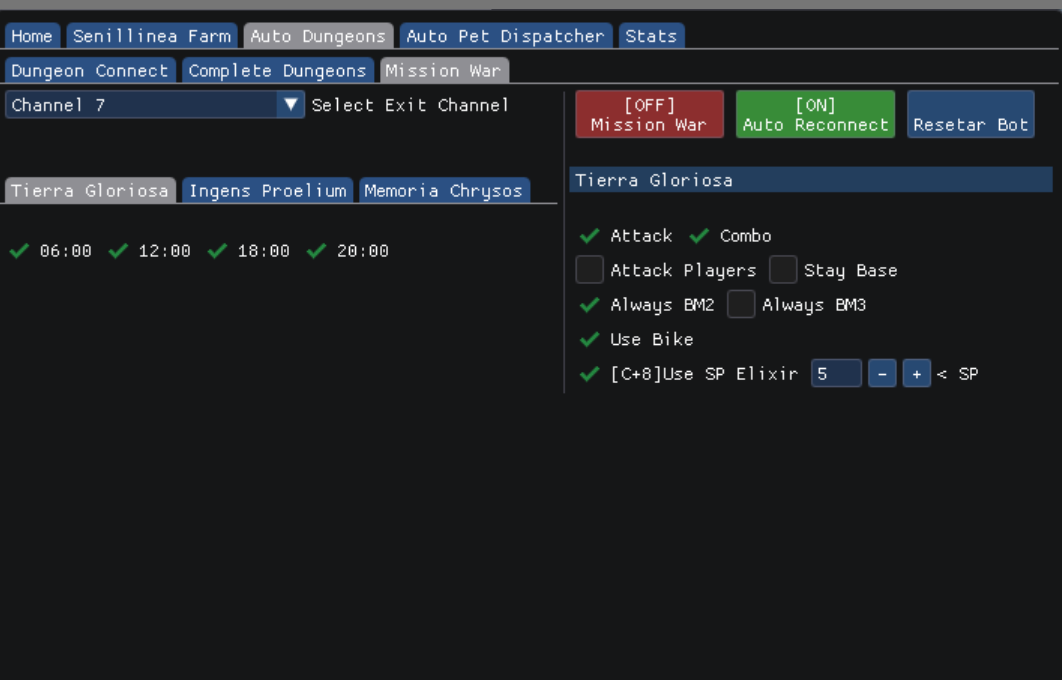
Bot de Missão de guerra - separado em 3 mapas diferentes com configurações individuais esse bot funciona em conjunto com os bots de dungeons e despacho, levando o personagem a guerra, batalhando, mantando guardiões e destruindo bases. Ao termino da missão de guerra o bot volta automaticamente a rotinha de Dungeons
INGLÊS
Cabal Bot is an automated system for the Cabal Online game.
The system was created in 2017 and has been working ever since, making life easier for people who can't spend all day in front of the computer playing.
The Bot works with a humanized system, naturally replicating the player's behavior within the dungeons, making it an extremely safe and reliable tool.
About the systems:
Dungeon Connect - This system connects different types of dungeons in a list to be completed in order, guaranteeing 24/7 uninterrupted farming.
Auto Refill - reads the connected player's inventory, searching for dungeon entries and automatically populates the Dungeon Connect list.
BM/AURA, Buffs/Debuffs and common systems - these tabs are common to all dungeons and each dungeon has its own, guaranteeing a specific configuration for each dungeon, with support for BM, aura,
Management Panel - This part of the bot manages the overall operation of the bot, allowing you to start, pause, or cancel its operation.
Auto Reconnection - If the character is disconnected, the bot will reconnect the player inside the dungeon, preventing the loss of entry.
General Controls - Here are options such as repeat dungeons, number of repetitions, use of SP potions, transformation (into a creature) to replenish SP between dungeons, button for the configuration system, button to save and load presets, and compact mode that makes the bot smaller.
Auto Refill - Obtains the total number of entries for the selected dungeon directly from the player's inventory and fills it with the correct value.
MultiCabal + BOT - This function allows the opening of more Cabal windows with the bot to farm with more characters on the same computer.
Stats - Window with general statistics of what is currently happening in the bot.
Skills - Configuration for using skills like sliding and retreating, using potions based on lost HP, combo usage and adjusting the bar size, guide stone to return to base after farming is finished, and turning off the computer after farming is complete to avoid leaving it on unnecessarily.
Battle Mode / Aura - Determine the BM value to extend the aura, delay time for skills A and B in BM3, combo sequences, synergies, and special level.
CtrlBuff - buff management system for the Ctrl bar at the top. This system is used for potions and protection buffs based on the character's lost HP percentage and/or the potion or buff's cooldown time before recasting. The ForceCD option is used by the bot to check if the pressed skill has entered its cooldown period.
F3 Buffs ForceCD - This option applies a cooldown check to the use of skills from the F3 bar, which is related to the boss debuff in each dungeon.
Chest / Inventory - This section handles inventory cleanup. The top part determines item breakage, allowing you to choose whether to keep items in 2 slots and with epic options (amp, dc, etc.).
The bottom part is for storing apps and materials in the chest. Selecting the RW or PW option opens the different types of chests available. Selecting the isvip option opens the chest via the inventory button instead of clicking on the motorcycle.
Rewards & Purchase - Enables the bot to go to Porto Lux (premium in-game required) to collect cube rewards and purchase HP, mana, mercenary stones, and teleportation stones.
Below are clan rewards and gift boxes to be configured based on the number of dungeons completed for the collection interval.
Delays & Sound - Configurable delay between target changes, item breakage delay, and maximum tolerance for ForceCD use on skills. Sounds emitted by the bot as a warning for certain situations.
Dungeon Timers - Configure the start time of dungeons. Useful when the quantity and time reset after midnight and you want to pre-configure it.
Max Time in Dungeon - Tells the bot how long it should stay in the dungeon. Used when, for some reason, the bot glitches inside the dungeon and stays longer than normal. With this option enabled, it prevents the bot from staying in the dungeon until its time runs out.
Discord hook - uses Discord to notify users about the bot's status, announcing drops, start time, potion quantity, and other very useful options when you can't be near your computer to monitor the bot's operation.
Pet dispatch bot - This bot automatically dispatches pets between dungeons, receives rewards, and waits for the cooldown period. It supports multiple dispatches and allows for primary map selection, but if dispatching to that map is not possible, it will try all other maps.
War Mission Bot - separated into 3 different maps with individual settings, this bot works in conjunction with the dungeon and dispatch bots, taking the character to war, battling, killing guardians, and destroying bases. Upon completion of the war mission, the bot automatically returns to the dungeon routine.